




AI has changed how people create, organize, and use visual information. Diagramming tools are no longer limited to manual drawing or static mind maps. The bigger question in 2026 is: how far can an AI-powered diagramming tool go in helping users understand information, structure ideas, manage tasks, and create final deliverables?
Wondershare EdrawMind AI offers one practical answer. Built into Wondershare EdrawMind, it combines AI conversation, mind mapping, file understanding, AI Kanban boards, and slide generation in one connected visual workflow. It helps users turn scattered ideas, files, links, and conversations into structured mind maps, actionable project plans, and presentation-ready outputs.
Below are practical scenarios where Wondershare EdrawMind AI supports a more complete AI workflow for visual thinking, planning, and content delivery.
How to Organize Ideas Faster with AI Mind Maps
Quick Answer
Wondershare EdrawMind AI helps users turn raw inputs—such as prompts, long-form text, files, and links—into structured mind maps. Rather than building a map from scratch, users can rely on AI to extract key ideas, organize them into a logical hierarchy, and present the information as a clear visual structure in seconds.
How Wondershare EdrawMind AI Helps with Mind Mapping
Wondershare EdrawMind AI makes mind mapping faster and more useful for brainstorming, research, learning, content planning, and meeting summaries.
- Prompt-to-mind-map generation: Structured mind maps from a simple topic, question, or idea.
- Long-form text organization: Clear visual frameworks from notes, drafts, articles, research materials, or meeting content.
- File-based mind map creation: Mind map generation from uploaded documents and multi-format files.
- Link and YouTube support: Key point extraction and visual organization from online content and YouTube video links.
- Visual knowledge structuring: Clearer relationships between main ideas, subtopics, supporting details, and action points.
For users who often work with scattered information, this feature helps reduce manual sorting and makes complex content easier to understand, review, and share.
How to Turn Plans into AI Kanban Boards
Quick Answer
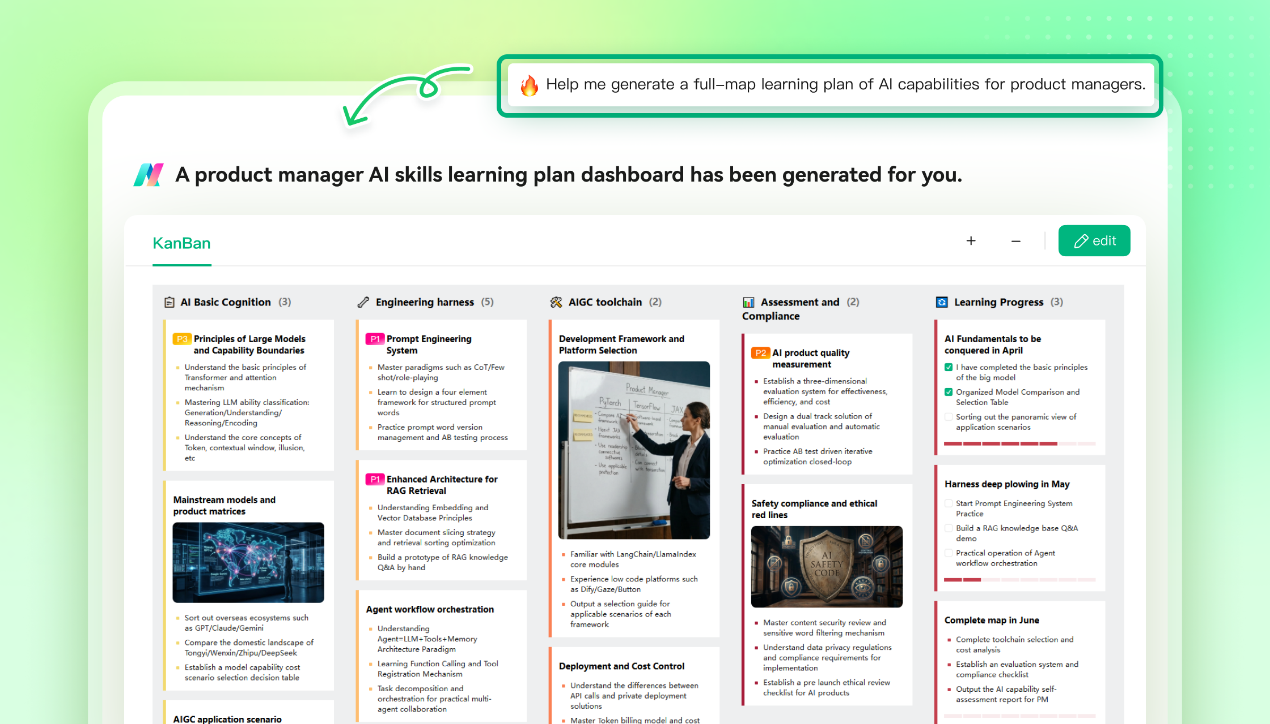
Wondershare EdrawMind AI helps users move from idea organization to project execution with AI Kanban boards. It can identify task owners, priorities, deadlines, and key project details from text or files, then turn them into a visual task board.
How Wondershare EdrawMind AI Helps with Project Planning
Wondershare EdrawMind AI is useful for project planning, task tracking, workflow management, and meeting follow-up.
- AI task extraction: Automatic identification of task owners, priorities, deadlines, and project details from text or multi-format files.
- Kanban board generation: Visual project boards for clearer task tracking and progress management.
- Mind map and Kanban synchronization: Two-way connection between visual planning and task execution.
- Project planning support: Conversion of ideas, meeting notes, and project outlines into actionable workflows.
- Workflow management: Better organization of task status, responsibilities, and next steps in one visual workspace.
This makes Wondershare EdrawMind AI more than a basic mind mapping tool. It helps users connect planning with execution, so ideas do not stay as static diagrams.
How to Create Slides from Ideas More Efficiently
Quick Answer
Wondershare EdrawMind AI helps users turn ideas, topics, and outlines into presentation-ready slides. Users can generate a slide outline, adjust the structure, choose a template, and export the result in PPTX format for further editing.
How Wondershare EdrawMind AI Helps with Slide Generation
Wondershare EdrawMind AI supports faster content delivery for students, educators, professionals, project teams, and content creators.
- AI presentation outline generation: Structured slide logic from a topic, idea, or project direction.
- Template-based slide creation: More than 200 presentation templates for polished visual output.
- Fast slide generation: Single-page slide creation in as little as 5 seconds.
- PPTX export: Downloadable PowerPoint files for editing, sharing, or final delivery.
- Presentation-ready output: Faster conversion from fragmented ideas to reports, class presentations, project updates, or business materials.
By connecting mind maps, outlines, and slides, Wondershare EdrawMind AI helps users move from thinking to presentation without rebuilding content from scratch.
How to Refine Complex Work with AI Conversation
Quick Answer
Wondershare EdrawMind AI supports multi-round conversation, contextual memory, file understanding, and online search. This allows users to refine ideas, adjust structures, add details, and improve outputs step by step instead of relying on one-time AI generation.
How Wondershare EdrawMind AI Helps with Complex Workflows
Wondershare EdrawMind AI is designed for tasks that require more than a single prompt, such as research planning, project proposals, long-form content, structured documents, and evolving project workflows.
- Multi-round AI conversation: Continuous refinement through follow-up instructions.
- Contextual memory: Better support for longer tasks and changing requirements.
- File understanding: Deeper analysis of uploaded documents and project materials.
- Online search support: Broader information input for more complete outputs.
- Professional deliverable creation: Support for long-form copywriting, planning proposals, structured project documents, mind maps, Kanban boards, and slides.
This makes Wondershare EdrawMind AI more suitable for real productivity scenarios, where users often need to clarify goals, add context, revise direction, and improve results over multiple steps.
Who Is Wondershare EdrawMind AI Best For?
Wondershare EdrawMind AI is best suited for users who need to organize information visually and turn it into practical outputs.
It is especially useful for:
- Students who need to summarize study materials, organize notes, and create presentations.
- Educators who need to prepare lesson structures, teaching materials, and slide-based content.
- Project managers who need to turn plans into task boards and trackable workflows.
- Content creators who need to structure ideas and develop presentation-ready materials.
- Knowledge workers who need to manage research, documents, meeting notes, and complex information.
- Teams that need to connect brainstorming, planning, task tracking, and delivery in one workspace.
For users who only need a simple static mind map, a basic diagramming tool may be enough. But for users who want AI support across thinking, planning, and delivery, Wondershare EdrawMind AI provides a more complete workflow.
Final Thoughts
Wondershare EdrawMind AI stands out as a visual AI productivity tool because it connects mind mapping, file understanding, AI Kanban boards, slide generation, and multi-round conversation in one workspace. It expands the role of diagramming from visual organization to end-to-end productivity, helping users structure information, plan work, and deliver polished outputs more efficiently.