





You have 15 seconds to hook someone mid-scroll. You need original footage, clean edits, and visuals that don’t look like everyone else’s template. You open your camera roll — nothing usable. Stock footage sites have the right vibe but wrong clip. Hiring someone to shoot costs more than the post will ever return.
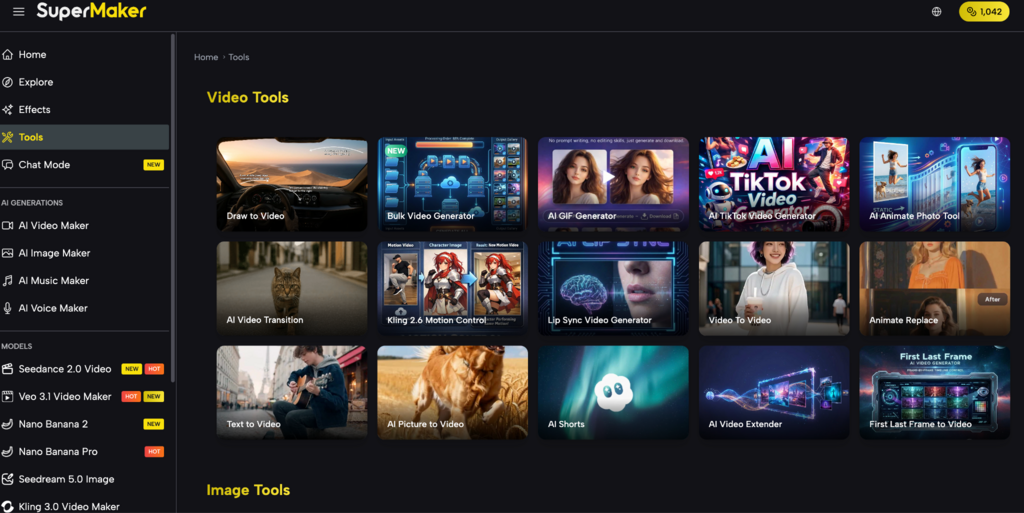
The fastest fix is generating the footage you need from a text description. Tools like AI Video Maker on SuperMaker turn a prompt into a ready-to-post video clip in seconds — no camera, no crew, no login required to start. This article covers exactly what the platform offers and how to go from idea to clip in under 10 minutes.

Why Short-Form Video Is Harder to Produce Than It Looks
A 15-second Reel looks effortless. Making it is not. The bar for visual quality on TikTok, Instagram, and YouTube Shorts has risen every year — and the tools most creators rely on haven’t kept up.
Original Footage Is Expensive and Slow to Get
Shooting your own video takes equipment, location access, decent lighting, and editing time. For creators publishing 5–7 posts per week, that cadence is unsustainable without a team. Stock footage is faster but comes with a different problem: the same clips appear across thousands of accounts, and audiences recognize them immediately. A travel clip from a major stock library has been in enough other creators’ videos that it reads as filler, not content.
Custom animation and motion graphics solve the originality problem but introduce a skill gap. After Effects, Premiere, and similar tools have steep learning curves. Outsourcing to a freelancer costs $100–$300 per clip at minimum. For a creator posting daily, that budget doesn’t exist.
The Consistency Problem
Short-form platforms reward consistency — posting frequency directly affects reach. But producing original visuals at publishing speed means most creators either slow down their posting cadence or accept lower visual quality. The creators who grow fastest are the ones who solve the production bottleneck, not just the content strategy.
What SuperMaker AI Video Maker Actually Lets You Do
SuperMaker packages multiple leading AI video models into one interface, accessible without an account to start. Here’s what that means for creators making short-form content.
- Text to Video — Type a scene description and generate a clip in seconds. Works across models: Veo 3.1 for cinematic quality with synchronized audio, Seedance 2.0 for smooth motion and realistic physics, Kling 3.0 for stylized creative output. You pick the model based on the look you’re going for.
- Image to Video — Upload a still — a product photo, a portrait, a graphic — and animate it into a moving clip. Useful for e-commerce posts, portfolio content, or any situation where you have a strong image but need motion to make it scroll-stopping.
- 9:16 Aspect Ratio Output — Native portrait format for TikTok, Reels, and Shorts. No cropping, no black bars. The clip comes out sized for the platform you’re posting to.
- AI Spokesperson Video — Generate a talking-head clip with a virtual presenter. Useful for product explainers, announcements, or tutorial intros without appearing on camera yourself.
- Multiple Model Access in One Place — Instead of juggling accounts across Runway, Pika, and CapCut AI separately, SuperMaker surfaces all major models in one interface. Switching between models takes one click, so you can compare outputs before committing.
One honest limitation: most clips generate at 5–8 seconds. For longer sequences, you’ll build from multiple clips. That’s standard for short-form anyway — most Reels and TikToks are assembled from short cuts, not single long shots.
How to Generate Your First Clip in Under 10 Minutes
No account needed. Go to supermaker AI Video Maker and follow these steps.
Step 1 — Choose your model The default is Veo 3.1 Basic, which handles most content types well. For faster output, try Seedance 2.0 Fast. For highly stylized or artistic clips, browse the model list and pick based on the example previews shown.
Step 2 — Write your prompt and set aspect ratio Select 9:16 for vertical content before typing anything — it affects how the scene is composed. Then describe your clip with specifics:
Weak: a coffee shop scene Strong: close-up of a latte being poured in a busy café, steam rising, warm morning light, cinematic slow motion, no people in frame
Step 3 — Generate and compare Hit Generate. Your clip is ready in under 60 seconds. Run 2–3 variations — slight prompt changes produce noticeably different outputs, and having options saves editing time later.
Step 4 — Download and post Export directly and drop into CapCut, Premiere, or post straight from your phone. No watermark removal, no licensing step, no attribution required.
How to tell if your clip is usable vs. needs regenerating:
- Motion looks fluid, not choppy or distorted at the edges
- The focal subject stays visually consistent throughout the clip
- The scene matches your prompt — if you asked for close-up, it’s actually close-up
FAQ
Can I use AI-generated video clips commercially on TikTok and Instagram?
Yes. SuperMaker assigns commercial use rights to generated content, so monetized posts, brand partnerships, and paid campaigns are all covered.
What’s the difference between Veo 3.1, Seedance 2.0, and Kling 3.0 on this platform?
Veo 3.1 produces cinematic output with native audio. Seedance 2.0 handles realistic motion and fast generation. Kling 3.0 is stronger for stylized or creative visuals. Try all three on the same prompt to compare.
Is SuperMaker AI Video Maker actually free to use?
You can generate without creating an account. Free credits are available at signup; heavier use requires a paid plan. The free tier is enough to evaluate output quality before committing.
How long are the video clips it generates?
Most models output 5–8 second clips. That’s standard for short-form content and matches how most Reels and TikToks are edited — as assemblies of short cuts rather than single long takes.
How does this compare to using CapCut’s AI features or Runway?
CapCut is stronger for editing and templates; its AI generation is limited. Runway offers high-quality generation but is more expensive and requires an account. SuperMaker gives access to multiple top models in one place with a lower entry cost.
Conclusion
Short-form video doesn’t have to mean slower output or lower quality. AI generation has reached the point where a single creator can produce original, platform-ready clips in minutes — without a camera, a crew, or a stock subscription. For creators who’ve been bottlenecked by production, this is the most practical solution available right now.
SuperMaker AI Video Maker is a solid place to start. No account required for your first clip, multiple models to compare, and 9:16 output built in. Worth spending 20 minutes on before your next posting session.