




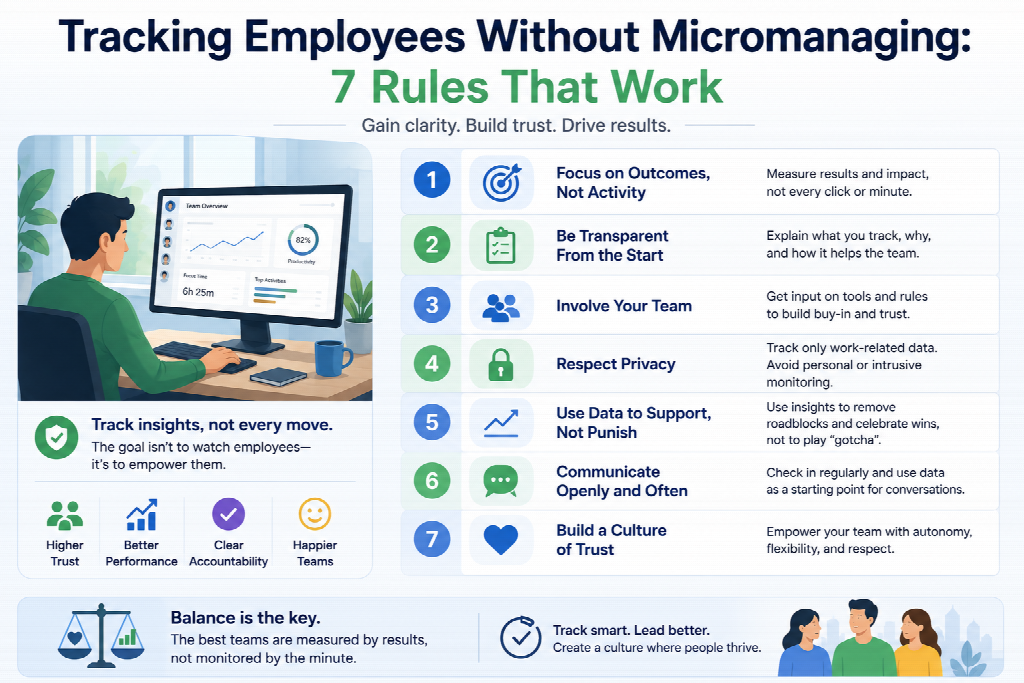
The difference between tracking and micromanaging is not the software. It is which numbers a manager looks at, how often they look, and what happens after they look. The same tool produces both outcomes depending on those three decisions.
Micromanagement watches small behaviours — how long someone was online, whether they replied within ten minutes, when they took a break. Responsible oversight watches patterns: whether goals are clear, whether deadlines are realistic, whether one person is carrying too much. Most managers who end up tracking employees badly did not intend to; they opened a real-time dashboard, saw an idle marker, and asked a question they would never have asked in an office. The tooling made a bad instinct cheap to act on.
The cost is measurable. Micromanaged employees are more than twice as likely to leave, and Gallup put global engagement at 21% in 2024 — its lowest since the pandemic — with the associated productivity loss estimated at $8.9 trillion annually, roughly 9% of global GDP.
Rule 1: Track work, not people
Every question a manager asks the data falls into one of two categories.
Systems questions ask about work: which stage of onboarding takes longest, where do handoffs stall, which team is over capacity, which tools nobody uses. These improve conditions for everyone.
Person questions ask about individuals: was Anna working yesterday, why is Tom’s activity low, who has the worst score. These turn the tool into a supervisor.
The practical test before opening a report: write down the question first. If it names a person, ask whether a systems question would answer it better. “Why is Tom slow on tickets?” is usually better asked as “why does ticket resolution vary so much across the team?” — same investigation, different starting assumption, and the second version finds process problems the first one misses.
What this looks like in configuration: default every dashboard to team-level aggregation. Individual drill-down should require deliberate navigation, not appear on the home screen.
Rule 2: Set the check-in cadence before you look at anything
Daily review of activity data is micromanagement regardless of intent. There is no useful management decision that requires yesterday’s activity levels.
A cadence that works:
| Frequency | What to look at | What decision it supports |
|---|---|---|
| Weekly | Team totals, capacity distribution | Workload rebalancing |
| Monthly | Trends, tool usage, project time | Process and staffing changes |
| Per invoice | Client hours and evidence | Billing |
| On exception | Individual data, with a reason | Investigation |
Real-time dashboards are the most dangerous feature in the category, because they invite continuous checking. If your tool has one, most managers should not have it open. Set a calendar reminder for the weekly review and close the tab in between.
Rule 3: Review by exception, not by default
Borrowed from finance, where nobody reviews every expense — they review the ones that break a rule.
Define what an exception is before deployment: a project running 30% over estimate, a person logging consistent overtime for three weeks, a client’s hours diverging from the scope. Then look only at those.
This inverts the default. Instead of scanning everyone’s data looking for problems, you look at nothing until something crosses a defined line. It cuts review time dramatically and, more importantly, removes the manager’s opportunity to develop suspicions about people who are performing fine.
The threshold matters more than the alert. Set it too tight and everything is an exception, which returns you to scanning everything.
Rule 4: Never let activity scores reach performance conversations
Activity level measures whether keyboard and mouse input occurred in a window — typically ten minutes. Monitask, for instance, counts input within each ten-minute period and treats anything above 50% as normal; the metric records nothing about what was produced.
It systematically undervalues thinking, reading, meetings, and any work done away from the keyboard. A developer designing an architecture on paper scores zero. An employee mechanically clearing a low-value inbox scores high.
Two consequences follow.
Using it in reviews produces performance theatre. People optimise for what is measured. If activity is measured, employees generate activity: unnecessary mouse movement, keeping documents open, avoiding breaks. Around 24% of monitored employees already take fewer breaks specifically to avoid appearing idle. You get worse work and worse data simultaneously.
It is fragile as evidence. Any employee who understands the metric can dismantle a case built on it, usually by naming the week they spent in client workshops.
Write the exclusion into the policy explicitly: activity data is used for capacity planning and billing, not for evaluation. Saying it once is not enough — managers under pressure will reach for whatever number is available unless the rule is written down.
Rule 5: Give employees their own data first
Asymmetry is what makes monitoring feel like surveillance. If managers see it and employees cannot, it is being done to them.
Nearly half of employees with access to their own activity data report using it to improve their performance. That is self-correction without a manager involved — the cheapest performance intervention available, and it costs nothing but a configuration setting.
It also converts the tool’s weaknesses into a shared problem rather than a hidden one. An employee who can see that Thursday’s workshop registered as idle will say so, and the team learns what the metric misses. A team that cannot see its own data assumes the numbers are being read at face value, which is usually correct and always corrosive.
Configuration check: confirm employees can see the full set of data collected about them, not a summary. Partial visibility reads as concealment.
Rule 6: Turn off the layers you do not need
The most effective anti-micromanagement measure is removing the capability, not resisting the temptation.
Most tools bundle several capture types, and each one that runs is an invitation to look. If you do not need screenshots for client billing, do not enable them. If you do not need full URL capture, leave it on domain level. If location data serves no purpose, do not collect it.
Two practical notes. Around 46% of tech workers say they would quit over keystroke logging or screenshot capture specifically, so these layers carry attrition risk independent of how carefully you use them. And default configuration changes on upgrade — moving to a higher tier for an unrelated feature can switch on capture you never decided to enable, so re-audit after every plan change.
The tools differ here in ways worth knowing. Monitask, ActivTrak, Hubstaff, and Prodoscore do not record keystroke content at all. Teramind, Veriato, and Controlio do at upper tiers. Session-based tools capture only between clock-in and clock-out; always-on agents run whenever the machine does.
Rule 7: Report back what the data changed
A monitoring program that only produces reports upward is experienced as extraction. One that visibly improves conditions is tolerated and eventually ignored, which is the goal.
When the data leads to something, say so publicly: a project rescoped because the estimate was wrong, a licence cancelled because nobody used the tool, a workload rebalanced because one person was carrying 60% of tickets, a deadline moved because the numbers showed it was never achievable.
This does two things. It demonstrates that the data serves the team, not just management. And it gives employees a reason to log time accurately — accurate data that leads to better estimates is worth producing; accurate data that disappears into a dashboard is not.
Teams that never hear an outcome learn that the tracking is either pointless or punitive. Neither conclusion helps.
What to do when the data shows a real problem
The rules above are not an argument for ignoring genuine issues. They are an argument for handling them properly.
Start from the work, never from the metric. “Your activity score is 34%” puts an employee on the defensive against a number they cannot contest. “The Henderson project has taken twice the scoped time — what’s getting in the way?” starts a conversation that might surface a blocker, a skills gap, an unrealistic estimate, or a personal situation. All four are more likely than the employee being lazy.
Assume the metric is wrong first. Check whether the pattern has an obvious explanation before treating it as a finding. Low activity during a workshop week is not a signal.
Never make monitoring data the sole basis for discipline. Beyond fairness, it does not hold up. Build any performance case on missed deliverables, quality issues, or specific incidents, with activity data at most as supporting context.
Consider that the problem is upstream. SHRM research consistently finds that unclear expectations drive more performance problems than insufficient oversight. If several people show the same pattern, the cause is the process, not the people.
Frequently asked questions
What is the difference between monitoring and micromanaging?
Monitoring observes patterns in work to inform decisions about process, capacity, and billing. Micromanaging observes individual behaviours — response times, idle moments, break timing — and intervenes on them. The same tool supports either, depending on which reports are used and how often.
How often should managers check tracking data?
Weekly for team-level capacity, monthly for trends, per billing cycle for client hours, and otherwise only when a defined exception threshold is crossed. Daily review of activity data has no legitimate management use and reliably reads as surveillance.
Should activity scores be used in performance reviews?
No. Activity measures keyboard and mouse input, not output, and undervalues thinking, meetings, and offline work. Using it in reviews produces performance theatre and creates cases that collapse under scrutiny. State the exclusion explicitly in the monitoring policy.
Does tracking employees actually reduce productivity?
It can. Around 72% of monitored employees say monitoring does not improve their own productivity, and surveillance-style approaches correlate with higher presenteeism and stress. Outcome-focused tracking paired with transparency shows measurable gains; behaviour-focused tracking generally does not.
How do I track contractors without micromanaging them?
Track only what the invoice requires — hours and, if contractually agreed, proof of work. Contractors are engaged for deliverables on their own equipment, so anything beyond billing verification is both unnecessary and legally exposed.
What if an employee’s numbers look genuinely bad?
Investigate the work, not the metric. Check whether the pattern has an obvious explanation, look at deliverables and quality rather than activity, and open the conversation from the project rather than the dashboard. Where several people show the same pattern, examine the process instead.
Can employees tell when they are being micromanaged through software?
Almost always. The signals are the questions managers ask — about specific hours, individual idle periods, why someone was offline — rather than the software itself. Employees infer the review cadence from the specificity of the questions.
Which monitoring features most encourage micromanagement?
Real-time dashboards, individual-first default views, frequent screenshots, and idle alerts. Each makes continuous checking cheap. Turning them off is more effective than trying to resist them, since the temptation is structural rather than a matter of managerial discipline.