





Close Menu
ZidduZiddu
  • News
  • Technology
  • Business
  • Entertainment
  • Science / Health
Facebook X (Twitter) Instagram
  • Contact Us
  • Write For Us
  • About Us
  • Privacy Policy
  • Terms of Service
Facebook X (Twitter) Instagram
ZidduZiddu
Subscribe
  • News
  • Technology
  • Business
  • Entertainment
  • Science / Health
ZidduZiddu
Ziddu » News » Technology » How to Download Facebook Videos
Technology

How to Download Facebook Videos

John NorwoodBy John NorwoodDecember 18, 20202 Mins Read
Facebook Twitter Pinterest LinkedIn Tumblr Email
How to Download Facebook Videos
Share
Facebook Twitter LinkedIn Pinterest Email

Have you ever watched a video in your Facebook feed and wondered, ‘how can I save facebook video for offline viewing?’

The truth is, it’s easier than it sounds. All you need is a reliable solution that can download Facebook videos to your computer. Some, like the GetfVid even allows you to change the format to MP4 for greater cross-compatibility and playback.

GetfVid is much better than other Facebook video downloaders as it doesn’t require you to register, download or even install a program. Simply connect to the internet, log in to your Facebook account and voila! you now have the ability to get any video you want to show friends and family.

Looking for an easy way to download Facebook videos free? You’ve come to the right place. Here’s a step-by-step procedure so you can get started.

Step 1. Locate the Facebook Video You Want to Download
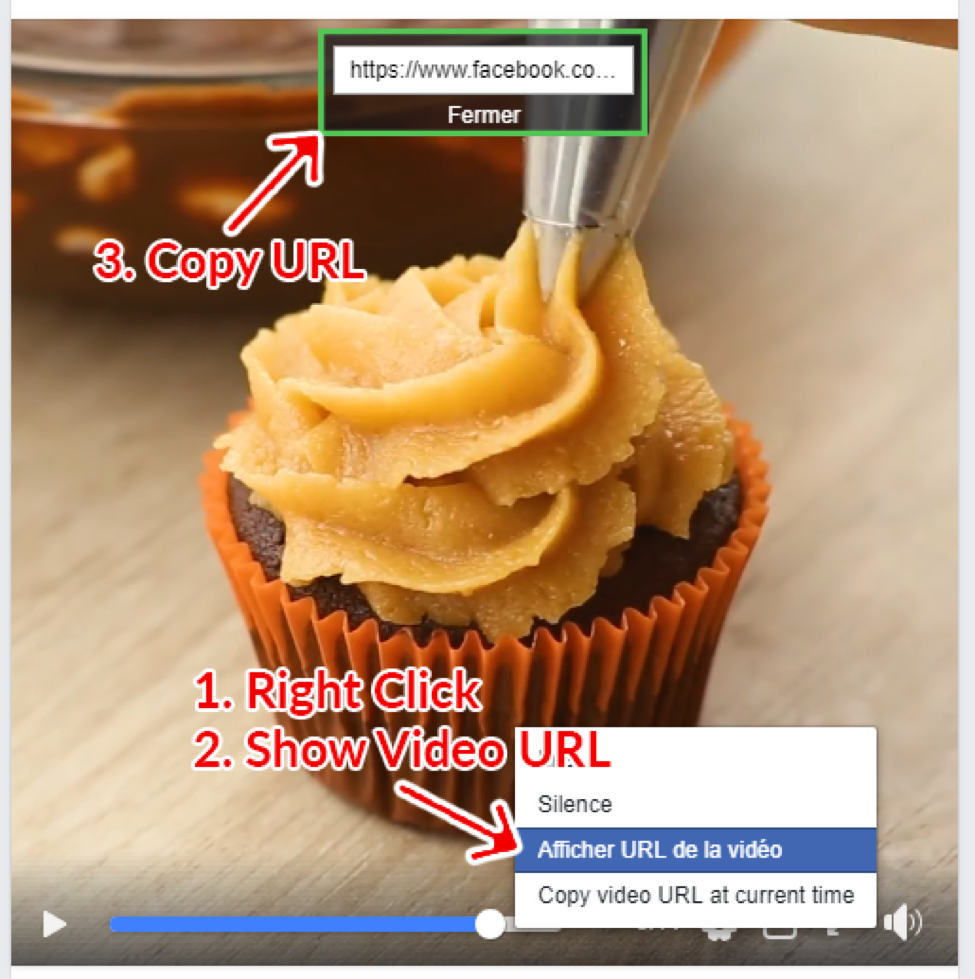
Scroll through your Facebook feed and find the video you’re looking for. You can also use the Facebook search bar in a pinch.

Once you find it, click on the play button so the video begins. Then, right click anywhere in the video space to call up several options. What you need is the ‘show video URL’. Copy the URL and proceed to the next step.

Step 2. Go to GetfVid and Paste the URL

Next, you will want to access the GetfVid website and look for the Facebook Video Downloader engine. It should be right on top and middle as soon as you access the website.

From here, paste the URL link in the field provided, then click on the button that says ‘Download’ on the right side.

The process of calling up the Facebook video takes a few seconds. During this time it’s not recommended to reload or refresh the page!

Step 3. Select the Video Quality You Want

GetfVid will take you to a page where you can choose the video quality. Choose to ‘Download in HD Quality’ or ‘Download in Normal Quality’ depending on your preference.

If an error comes up check if the video is public. You can also try to install GetfVid’s extension in Chrome.

Share. Facebook Twitter Pinterest LinkedIn Tumblr Email
Previous ArticleHere’s Why Online Gaming Is Far Better Than Offline Gaming
Next Article 5 Reasons To Use An Online Whiteboard When Working From Home
John Norwood

    John Norwood is best known as a technology journalist, currently at Ziddu where he focuses on tech startups, companies, and products.

    Related Posts

    Future-Proofing Your Workstation: What Features to Look for in a PC That Will Last Through 2028 and Beyond

    November 30, 2025

    How to Use CCT (Colour Temperature) in Your LED Bulbs

    November 29, 2025

    4 Essential Gadgets for Your Condo this Winter Season

    November 27, 2025
    • Facebook
    • Twitter
    • Instagram
    • YouTube
    Follow on Google News
    What Makes Compliant Training Resource Solutions Stand Out in the VET Sector
    December 6, 2025
    Transforming the Sun-Kissed Home: A Deep Dive into Tampa’s Remodeling Industry
    December 4, 2025
    Buying in Christchurch’s Improving Market: Essential Building Inspection & Report Guide
    December 3, 2025
    Does Biopsy Always Mean Surgery for Thyroid Nodules?
    December 3, 2025
    Flare-Up Management: How Dermatologists Support Skin Health
    December 3, 2025
    Sami Wunder: Dating Again After a Breakup or Divorce
    December 1, 2025
    How to Use API Trading to Simplify Your Options Strategies
    December 1, 2025
    4 Top Benefits to Keep in Mind When You’re Enlisting a Commercial Real Estate Agent
    December 1, 2025
    Ziddu
    Facebook X (Twitter) Instagram Pinterest Vimeo YouTube
    • Contact Us
    • Write For Us
    • About Us
    • Privacy Policy
    • Terms of Service
    Ziddu © 2025

    Type above and press Enter to search. Press Esc to cancel.