




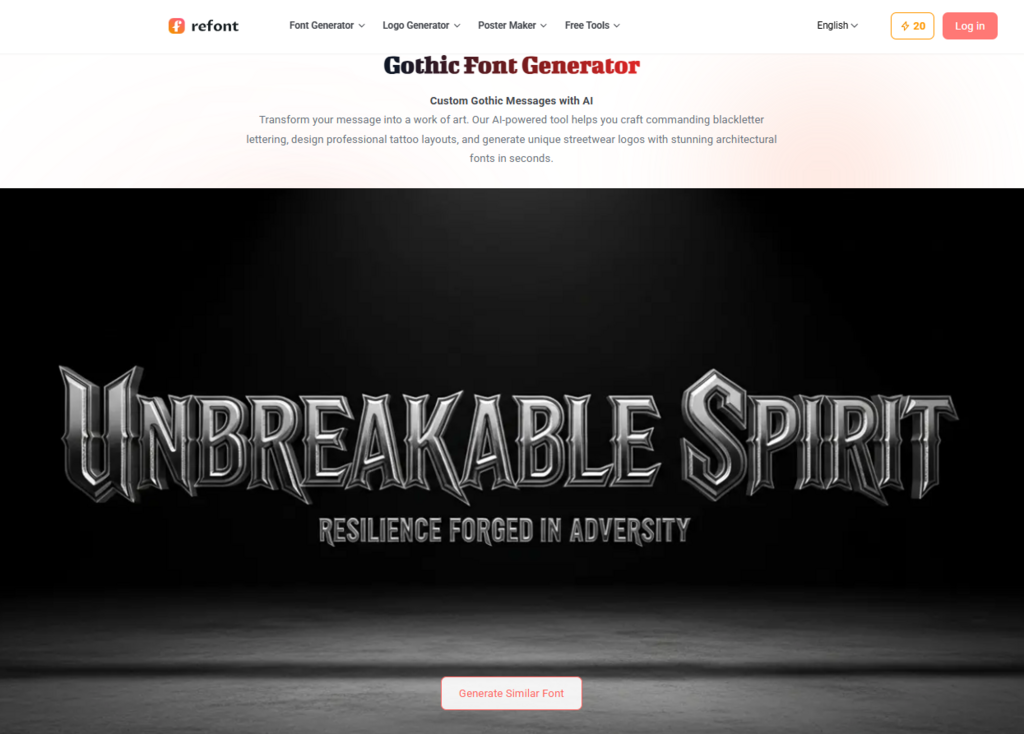
In the hyper-saturated digital landscape of 2026, the battle for attention is won in the details. Whether you are an independent creator, a high-level executive, or a digital marketer, your “digital handshake”—the way you present yourself in an inbox or on a digital canvas—defines your professional authority. While most professionals settle for the sterile uniformity of Arial or Calibri, a new movement in personal branding is looking backward to move forward. The architectural power of medieval aesthetics, reimagined through a modern gothic font generator, is becoming the secret weapon for those who want their identity to carry weight, history, and unmistakable character.
The Evolution of the Digital Signature: From Functional to Formidable
The concept of a signature has always been more than just a legal verification. Historically, a signature was a mark of status, a flourish of personality that suggested the hand of the creator. However, the transition to digital communication stripped this personality away. We’ve traded the quill for the keyboard, resulting in a “personality deficit” where every professional email looks identical.
For creators and professionals, this is a significant pain point. When an illustrator signs a digital piece or a CEO sends a high-stakes proposal, a generic sans-serif font feels dismissive. It lacks the “Power Signature” effect. By utilizing a gothic font generator, you can reclaim that sense of intentionality. Gothic styles—ranging from the sharp, disciplined lines of Textura to the more fluid, ornate flourishes of Fraktur—offer a visual complexity that instantly signals craftsmanship and depth.
Why Your Digital Identity Needs a Gothic Twist
You might ask: “Isn’t Gothic too aggressive for professional use?” The answer lies in the curation. Modern digital branding isn’t about mimicking a 12th-century manuscript; it’s about extracting the DNA of those styles—symmetry, verticality, and contrast—and applying them to a 21st-century context.
1. The Psychology of Authority
Gothic lettering is inherently architectural. Its structure mimics the cathedrals of Europe—soaring heights and solid foundations. When you use a gothic font generator to craft a personal logo or an email sign-off, you are subconsciously tapping into these themes of permanence and strength. It tells the recipient that your brand is not a fleeting trend, but something built to last.
2. Breaking the “Scroll Fatigue”
We receive hundreds of notifications daily. Our brains are trained to skim and skip. A unique aesthetic interruption, such as a stylized Gothic signature, forces the eye to pause. It creates a “visual friction” that makes your name more memorable than the body of the text itself.
Strategy: How to Simplify Gothic Complexity for Modern Use
One of the biggest hurdles for professionals is the perceived “clutter” of old-world fonts. Traditional Gothic can be hard to read if overused. The goal of a “Power Signature” is to balance edge with legibility. Here is how to use a gothic font generator effectively for your professional identity:
The 80/20 Rule of Typography
Keep 80% of your professional communication clean and functional (like a standard Serif or Sans-Serif) and use the Gothic element for the 20% that represents your “Mark”—your name, your monogram, or your primary brand headers. This contrast makes the Gothic element pop without overwhelming the reader.
Adjusting for Scale and Clarity
When using a gothic font generator, pay close attention to the negative space within the letters. For digital signatures that will be viewed on mobile screens, you want a “Modern Gothic” or “Fine-Line Gothic” style. These versions maintain the sharp angles and dramatic terminals of the original style but increase the spacing between strokes to ensure that an “e” doesn’t look like a “o” at small sizes.
For Creators: The Gothic Watermark and Artist Identity
If you are a photographer, digital artist, or designer, your watermark is your most frequent point of contact with potential clients. A generic watermark is easily ignored; a Gothic watermark is a statement.
Using a gothic font generator allows you to create a signature that feels like a physical stamp or an engraving. This is particularly effective for:
- Copyright Protection: A complex, stylized font is harder to digitally “content-aware fill” out of an image than a simple font.
- Aesthetic Synergy: If your work leans toward the dark, the atmospheric, or the high-fashion, a Gothic signature provides the perfect thematic frame.
Step-by-Step: Designing Your Power Signature
Ready to upgrade your digital presence? Follow this workflow to ensure your new identity remains professional and polished:
Step 1: Define Your Vibe
Are you aiming for “Dark Luxury” or “Old World Heritage”?
- Blackletter: Best for strength and authority.
- Rotunda: A bit softer and more legible, great for a more approachable professional feel.
- Fraktur: The most decorative, perfect for artists and creative leads.
Step 2: Test the “Inversion”
Check how your generated font looks in both black-on-white and white-on-black. Professional email clients often switch to “Dark Mode.” A high-quality gothic font generator ensures the character weight is balanced so it doesn’t “glow” or become blurry when inverted.
Step 3: The Monogram Approach
Sometimes a full name in Gothic script is too much. Try generating just your initials. A Gothic monogram serves as a powerful, compact “seal” that can be used as a profile picture, a favicon, or a discreet email footer.
The Technical Edge: Why Refont’s Logic Works
The reason many people fail at using Gothic fonts is that they download a static font file that doesn’t adapt to their specific text. Modern AI-driven tools have changed the game. When you use a specialized gothic font generator, the tool doesn’t just display letters; it calculates the kerning (the space between letters) and the stylistic ligatures that make Gothic script look authentic.
Standard fonts often have “collisions” where the decorative tails of one letter overlap the next in an ugly way. A generator solves this by providing unique variations of each character, ensuring that your “Power Signature” looks like it was hand-drawn by a master calligrapher, even if it was generated in seconds.
Conclusion: Making Your Mark in 2026
The digital world is increasingly cold and automated. By incorporating the rich, tactile history of Gothic typography into your professional persona, you are humanizing your digital presence. You are signaling that you care about aesthetics, history, and the fine details of your craft.
Whether you are signing off on a million-dollar contract or watermarkng your latest digital masterpiece, don’t settle for the invisible. Use a gothic font generator to craft an identity that doesn’t just sit in the inbox—it commands it. Your signature is the final word on your work; make sure it’s a word worth remembering.